![SPRII-udenR_logo-orange+dark.png]](https://help.sprii.io/hs-fs/hubfs/SPRII-udenR_logo-orange+dark.png?height=40&name=SPRII-udenR_logo-orange+dark.png)
What it does, and what it doesn't
The integration imports products, variant prices and inventory from the Product Feed URL saved in Sprii. If MCB sends completed-order updates, Sprii can receive them through its MCB webhook.
Requirements
- Administrator access to the Sprii Page
- Your shop's VAT or tax ID
- Your shop's site address
- Ask MCB Support for a Product Feed URL and API key for your Sprii connection. Include your shop's VAT or tax ID. Sprii’s current MCB settings also direct you to MCB for these values. Also ask MCB to send completed-order updates to Sprii.
Set it up
- In Sprii, select your Page and go to Page settings
 > E-commerce integration

- Find MCB and click Configure.
- Click Activate webshop
 if it is inactive.
- Enter your shop's web address in Site Url.
- Paste the feed address supplied by MCB into Product Feed Url, and paste their key into API Key.
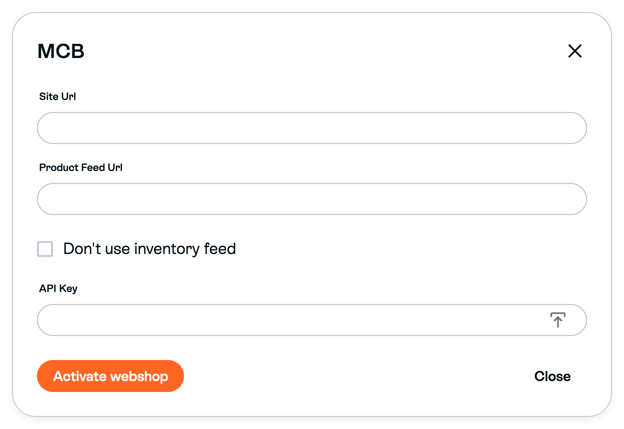
The picture is a blank, inactive example for locating the fields. It does not show a completed connection. - Choose Don’t use inventory feed according to MCB’s setup: leave it unchecked to use the separate inventory feed, or select it if MCB confirms that your connection should not use that feed. In the current Sprii panel, this checkbox may appear as No utilices el feed de inventario.
- Click Save

- Click Run product sync
 to start the first full import.
After Sprii accepts the saved settings, check the imported catalog before using it in a campaign. New webshop checkout links use the Page’s current connection settings, including in campaigns you already created. Saving a different address does not rewrite a checkout link already generated.
Sprii saves the feed address in lowercase and removes a final slash. If the URL MCB gives you contains uppercase characters that matter to the address or token, ask MCB for a compatible URL instead of changing a credential yourself.
Limitations
- Variant prices come straight from the MCB feed. There is no separate setting in Sprii to switch different variant prices on.
- The full product feed refreshes about every 30 minutes. That is how often Sprii asks, not a promise about when a change appears.
- Completed-order updates depend on MCB sending them to Sprii. A Sprii Completed status is not payment proof; check payment and order status in MCB.
Need help? Contact Sprii Support