![SPRII-udenR_logo-orange+dark.png]](https://help.sprii.io/hs-fs/hubfs/SPRII-udenR_logo-orange+dark.png?height=40&name=SPRII-udenR_logo-orange+dark.png)
What it does, and what it doesn't
The integration brings the DanDomain Classic products you add to your campaigns into Sprii, including variants, prices, images, and stock. Sprii keeps products in active campaigns up to date. Shoppers check out in DanDomain, where payment, shipping, and fulfillment stay. Classic does not send completed-order confirmations back to Sprii.
Requirements
- Administrator access to the Sprii Page and your DanDomain Classic shop
- Your shop's web address, including
https:// - Confirmation of whether your DanDomain prices include VAT
Set it up
- In Sprii, select your Page and go to Page settings
 > E-commerce integration
- Find DanDomain Webshop Classic and click Configure.
- Click Activate webshop
 if it is inactive.
 - In DanDomain Classic, go to Settings > Integration and create an API user. Give it Product: Read and update and Settings: Read permissions, then save the user.
- Copy the generated API key straight into API Key in Sprii before closing the DanDomain window. DanDomain shows the new key once.
- Enter your webshop address, including
https://, in Site Url. Keep Checkout Type set to Shop Checkout. - Choose Add VAT to dandomain price (only if dandomain has ex VAT prices) to match your source prices: select it if DanDomain prices exclude VAT; leave it off if they include VAT.
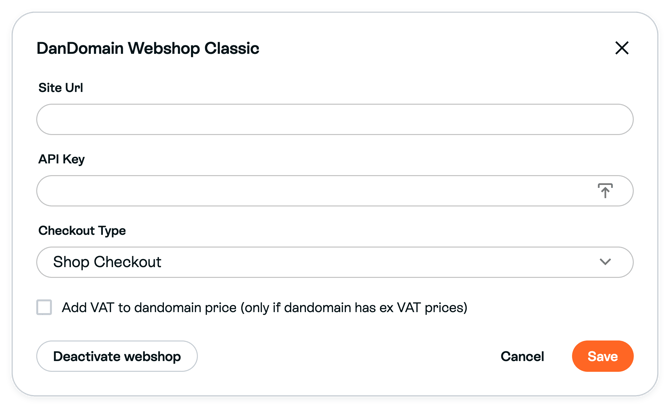
The picture shows the unchecked example. Choose the setting that matches your shop. - Copy Webhook URL from Sprii.

- In DanDomain, go to Settings > Integration > Webhook and create a webhook. Paste Sprii's URL into URL, choose Product as the webhook type, set Active on, and save it.
- In DanDomain, go to Settings > Shop settings > Products > Stock management. Turn off Reserve products in basket (Reserver varer i kurven in Danish) and save the change.
- Return to Sprii and click Save

- Open the campaign you want to use. In Add products, choose Webshop product… and search your shop by product name or SKU. Add the products you want to include.
- Check the selected products, variants, prices and stock in that campaign before using them in your show.
The integration is configured for this Page. New webshop checkout links use the Page’s current connection settings, including in campaigns you already created. Saving a different address does not rewrite a checkout link already generated. There is no Product catalog for this integration. Sprii refreshes only products in active campaigns; products outside an active campaign are not kept up to date. Use Update active campaign products to refresh those active-campaign products manually.
Limitations
Important: Classic orders stay New in Sprii. Check payment, shipping, and fulfillment in DanDomain before you fulfill an order.
- Custom Sprii campaign prices do not pass to DanDomain Shop Checkout. Change the price in DanDomain, then use Update active campaign products to refresh products already in an active campaign.
- Package and bundle products are not supported.
- Products and prices in active campaigns refresh about every 5 minutes. The Product webhook adds faster inventory updates, but a missing webhook does not stop the scheduled refresh.
- Sprii reservations can reduce campaign availability while DanDomain stock stays unchanged.
Need help? Contact Sprii Support